 Moon Academy
 BTC +1.84%
 ETH -0.62%
 SOL +3.10%
 XRP -1.27%
 DOGE +0.44%
 TSLA +2.05%
 XAUUSD +0.31%
 XAGUSD -0.18%
 LTC +0.92%
 HYPE -2.41%
Independent guide · Updated 29 August 2026
The Moon.com App — What Exists and What Does Not
A browser product with an installable web app, not a store listing. Here is how to install it, and where the phone is genuinely the wrong tool.
Open Moon.com → Read the full review
18+Leveraged betting carries a high risk of losing your entire wager. Affiliate links; not investment advice.
What actually exists
Moon Academy runs in the browser. The mobile experience is the same site, laid out for a phone, and it can be added to a home screen as an installable web app so it opens without browser chrome. That is what the product ships, and it is worth stating plainly because pages about products like this one routinely claim a store listing that does not exist. If a native build appears in an app store later, it will appear in the operator's own announcements first — their press releases — and not in a download button on a third-party guide.
Treat any APK offered elsewhere as hostile. An account that can send funds to a crypto address is exactly the account a repackaged installer is looking for.
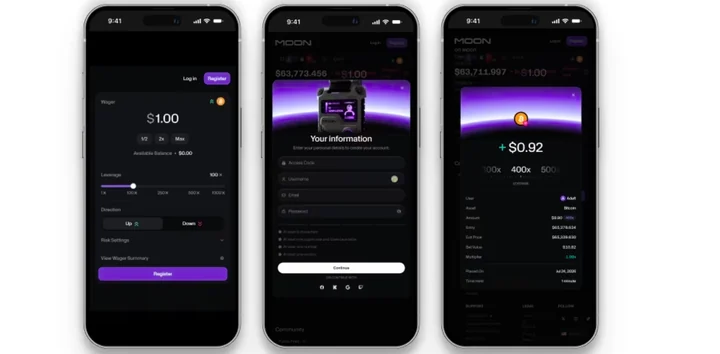
Putting it on the home screen
| Platform | How |
|---|---|
| Android — Chrome | Open the site, tap the menu, choose Add to Home screen (or accept the install prompt when it appears). |
| iOS — Safari | Open the site, tap Share, choose Add to Home Screen. It must be Safari; other iOS browsers cannot install. |
The installed version is the same account and the same session. There is nothing to migrate and nothing extra to sign up for.
What the phone is worse at
Two things degrade on a small screen and both matter on this product. The chart is smaller, so the liquidation line is harder to read at a glance and easier to misjudge at a high multiplier. And a phone invites the exact behaviour this product punishes: a bet placed in a queue, on a bus, in a spare thirty seconds. The leverage page has the arithmetic on how little a price has to move at 1000x; on a phone screen that distance is roughly the width of the line itself.
If you intend to hold positions rather than open and close them in seconds, the desktop layout is the honest recommendation.
FAQ
Is there a Moon.com app on Google Play or the App Store?
Not one we can confirm. The product runs in the browser and can be installed as a web app from the home-screen menu. Do not install an APK from a third-party site.
Does the web app work offline?
No, and it should not — it is a live-price product. Losing connection mid-position is a real risk to plan around, not a feature to work around.
Is my account different in the app?
No. Same account, same balance, same session.
Which mobile browser should I use?
Chrome on Android, Safari on iOS. On iOS only Safari can add the site to the home screen.
Is the demo available on mobile?
Yes. The Play Money balance works exactly as it does on desktop.
Leveraged products & crypto trading analyst
Checked against the operator's terms, Help Center and cashier. Published · how we test and score.